Optionia DocsOptionia Docs
Submit a Ticket
shopify app store
  • Visit Optionia Website
  • Privacy Policy
  • Terms of Service
  • FAQs
  • Tutorials

© 2026 Optionia. All rights reserved.

Powered by

ParseLab, LLC
  • category-iconGetting Started
  • category-iconOption Sets
  • category-iconOrders
  • category-iconSettings
  • category-iconConfiguration
  • category-iconLive Preview
  • category-iconPackages
  • category-iconHelp & Support
  • category-iconPrice Add-Ons
  • category-iconConditional Logic
  • category-iconDesign Theme Styling
  • category-iconUninstallation
Category
  • category-iconGetting Started
  • category-iconOption Sets
  • category-iconOrders
  • category-iconSettings
  • category-iconConfiguration
  • category-iconLive Preview
  • category-iconPackages
  • category-iconHelp & Support
  • category-iconPrice Add-Ons
  • category-iconConditional Logic
  • category-iconDesign Theme Styling
  • category-iconUninstallation
Getting Started-icon Getting Started
2 min to read
Last Update on 05 September 2026

Optionia Overview

Optionia is a Shopify app that lets you add advanced product options to your store without writing any code. You can create different types of options, add extra charges, use conditional logic, and customize the appearance to match your store's theme.


With Optionia, you can create options such as color swatches, image swatches, dropdowns, checkboxes, and more. Once installed, Optionia is available under Apps in your Shopify admin. The dashboard provides a quick overview of your option sets, orders, and sales, along with setup tutorials and support shortcuts.
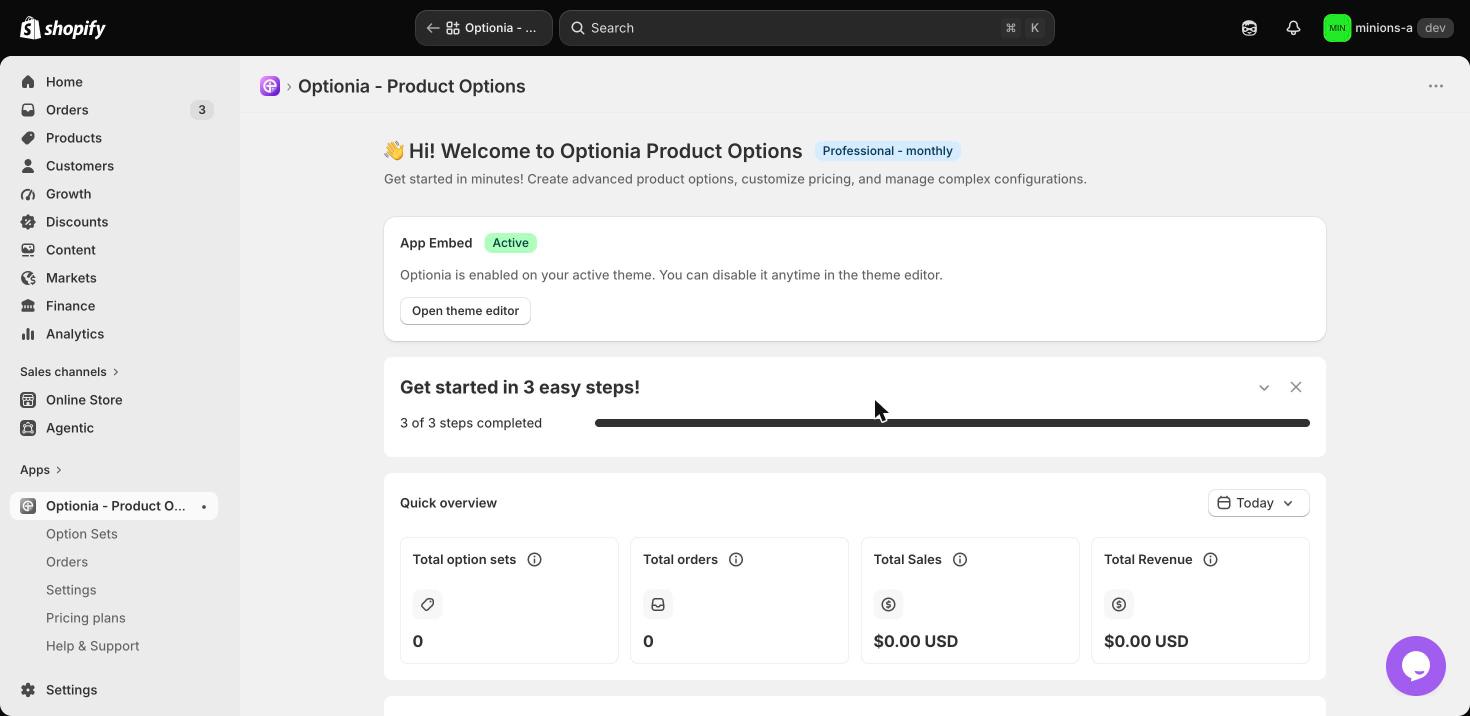
Optionia app dashboard in Shopify admin

The app is organized into five main sections:

  • Option Sets: Create and manage the option sets you want to add to your products.
  • Orders: View orders that include custom product option selections.
  • Settings: Configure general app settings and customize the app's appearance.
  • Pricing Plans: Manage your subscription and billing details.
  • Help & Support: Get assistance or contact the Optionia team.

After installing Optionia, open it from the Apps section in your Shopify admin. From the dashboard, you can create your first option set, customize your options, and apply them to your products. 

In short, Optionia gives you an easy way to create, customize, and manage advanced product options, helping you offer more choices to your customers without coding.


Need Help?


If you have any questions or need assistance, We will be happy to help.
  • Live Chat for quick assistance.
  • Submit a Support Ticket for detailed questions or issues.
  • Email: support@optionia.com


Did this post help you?